On Monday, I’ll be back in the role of an independent consultant, so I’m upgrading services in my office so I can work efficiently. One thing I want to do is upgrade from a plain old DSL line to a business FIOS line. I have FIOS at home and I’m very happy with it, so it’s time for FIOS at work.
I went to Verizon’s web site and started the online ordering process for FIOS. I got to the page where I can pick my router, and clicked the NEXT button. Sorry, no can do; the button uses JavaScript, and the code has an error in it, so you can’t go any further.
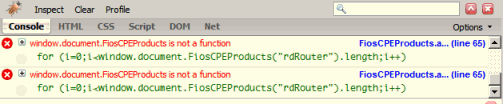
Maybe it’s an issue between the web site and Firefox. After all, we can’t assume that Verizon’s web programmers would support all web browsers, so I tried the same with IE7.
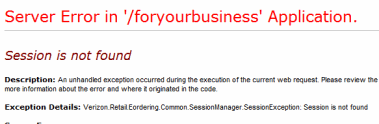 How did things fare with IE7? Worse. Click the order button on Verizon’s Packages and Prices page, and get a nice ASP.Net script error.
I don’t know what’s scarier: the inability to submit an order form using Firefox, the inability to start an order form using Internet Explorer, or the fact that they don’t have custom ASP.Net error pages.
 sides of march (Brian DeMarzo)
Leave a comment